DigiFlow NYC API Documentation (1.7.7.9)
Our Key Features Include:
- Easy and fast file publishing to WordPress.
- Comprehensive metadata and categorization management for your files.
- Seamless integration with subscription systems and access control.
- Advanced API usage monitoring and rate limits.
- Secure communication support via HTTPS to ensure data privacy and security.
Additionally, you can explore our specific APIs that cater to various publishing needs. For detailed information about each one, refer to the relevant pages in our documentation.
We are committed to providing a complete and reliable solution for your WordPress publishing needs. Feel free to explore our features and reach out to our support team whenever you require assistance or have any questions.
To get started with the DigiFlow NYC API, follow these steps:
1) Contact the DigiFlow NYC team to request the following information:
- Username
- Password
- Public Key
2) Once you've received this information, you'll be ready to begin using the API.
Additionally, keep in mind these important tips:
- Ensure you use a valid API Key when making requests to the API endpoints.
- The API exclusively responds to secure communications via HTTPS. Any requests sent via HTTP will automatically be redirected to the corresponding HTTPS resource.
- Responses from API requests are provided in JSON format. In the event of an error in an API request, the error will be included in the JSON response as an error key.
Overview
The DigiFlow NYC API allows automated publishing of files to WordPress sites. It was developed to facilitate and accelerate the process of sharing documents and reports on corporate portals and news sites.
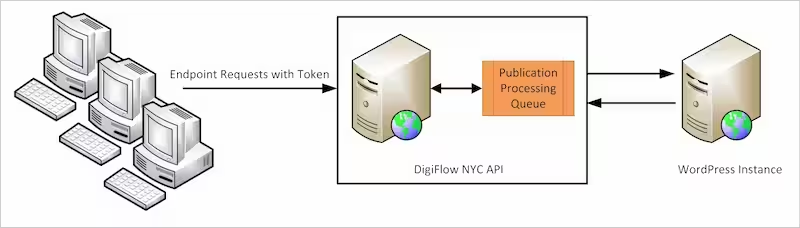
The main features of the API include:
- Insertion of new files with full metadata
- Updating existing files
- File deletion
- File information query and filters
- Subscription and access control support
- Integration with external systems via callbacks
- Usage monitoring and request logs
The API is suitable for use cases such as:
- Bulk publishing of financial reports
- Release of documents for IR portals and the press
This section provides a quick overview of the API's capabilities and primary application cases. The remainder of the documentation provides technical details for integration.
Authentication:
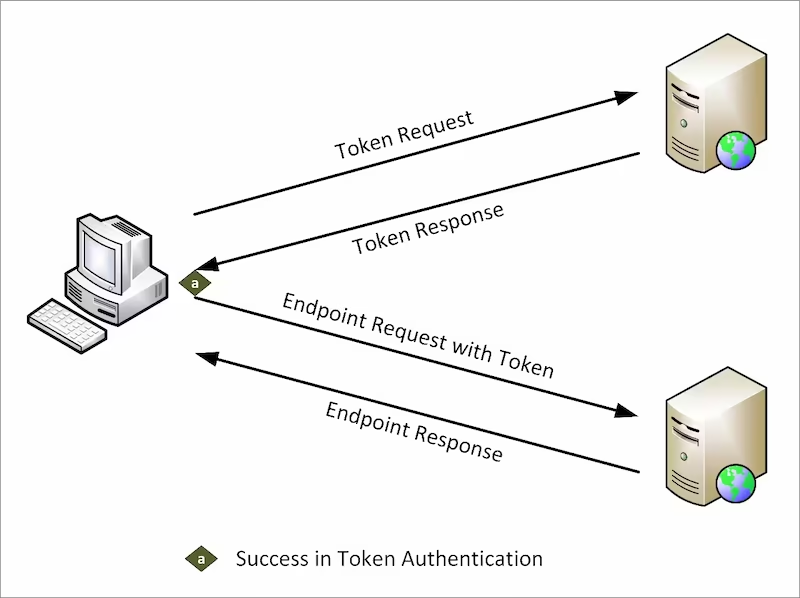
To access our resources, you need to authenticate using the Public Key, username, and password to obtain the required access token. Below, we detail the steps to obtain them and provide information about relevant error codes.
The DigiFlow NYC API employs the following authentication methods:
Use the X-DFW-KEY header with your Public Key for authentication purposes.
Include the Authorization header, containing a Bearer token and your Access Token.
By following these steps, you will ensure secure and authenticated access to our API endpoints.
The issuance of the access token is explained in detail in the Authorization section, which includes the necessary request model.
Feel free to reach out to our support team for additional assistance or to clarify any questions that may arise. We are here to help.
Authentication Success:
In the event of successful authentication, you will receive an HTTP 200 OK response.
The response for successful authentication is in the following format:
{
"status": "success",
"message": "Access token successfully created.",
"timestamp": 1694460560844,
"access_token": "Ef_CzQ1TUb6_...",
"token_type": "Bearer",
"expires_in": 28800
}
This response indicates that the authentication was successful, and an access token has been generated. The access_token field contains the generated token, and the token_type specifies the type of token (e.g., Bearer). The expires_in field indicates the expiration time of the token in seconds.
Authentication Error:
In the event of authentication failure, whether due to a missing, malformed, or invalid API key, you will receive an HTTP 401 Unauthorized response.
Furthermore, when a request is made to an API endpoint without the proper authorization, the response will be in the following format:
{
"status": "error",
"message": "The user's public key not found or is invalid.",
"timestamp": 1694393264131,
"reference": "https://api.digiflow.nyc/wiki"
}
503 response
An HTTP 503 response from our servers indicates there is an unexpected spike in API access traffic. The server is usually operational within the next five minutes. If the outage persists or you receive any other form of an HTTP 5XX error, contact support.
Need Help?
We provide email support to assist you whenever you need it.
If you have any questions, please feel free to contact us at support@api.digiflow.nyc. We are here to help and respond to your inquiries.
Additionally, you can explore our resources in this help documentation and code examples, which are available to make your use of our API easier. We are committed to providing the assistance you need.
Servers
Development Address:
https://dev.digiflow.nyc
Production Address:
https://api.digiflow.nyc
Attention
Values enclosed in {{}} represent variables that should be replaced with their actual values.
Examples:
{{API Address}} = https://dev.digiflow.nyc
{{Public Key}} = aaaaaa-bbbbb-...
Status
API status verification resources.
Status
Endpoint: /dfw/status
Endpoint intended for verification of API status.
Request
HEADER PARAMETERS
| X-DFW-KEY |
string
Optional Parameter: Public Key provided by DigiFlow NYC.
Example: {{Public Key}}
|
						curl --location '{{API Address}}/dfw/status' \

						--header 'X-DFW-KEY: {{Public Key}}'
Response
HTTP Status Code: 200
{
"status": "available",
"message": "API is available.",
"timestamp": 1694460560844
}
HTTP Status Code: 500
{
"status": "unavailable",
"message": "API is unavailable.",
"timestamp": 1694460560844
}
Authorization
API authentication resources.
Access Token Request
Endpoint: /dfw/token
Endpoint of access to token access to resources that need API authentication.
Request
HEADER PARAMETERS
X-DFW-KEY
required |
string
Mandatory Parameter: Public Key provided by DigiFlow NYC.
Example: {{Public Key}}
|
REQUEST BODY SCHEMA: application/x-www-form-urlencoded
grant_type
required |
string
Mandatory Parameter: The grant type, which must be 'password'.
Example: password
|
username
required |
string
Mandatory Parameter: User Name provided by DigiFlow NYC.
Example: {{USERNAME}}
|
password
required |
string
Mandatory Parameter: User Password provided by DigiFlow NYC.
Example: {{PASSWORD}}
|
					curl --location '{{API Address}}/dfw/token' \

					--header 'X-DFW-KEY: {{Public Key}}' \

					--header 'Content-Type: application/x-www-form-urlencoded' \

					--data-urlencode 'grant_type=password' \

					--data-urlencode 'username={{Username}}' \

					--data-urlencode 'password={{Password}}'
Response
HTTP Status Code: 200
{
"status": "success",
"message": "Access token successfully created.",
"timestamp": 1694460560844,
"access_token": "Ef_CzQ1TUb6_...",
"token_type": "Bearer",
"expires_in": 28800
}
HTTP Status Code: 401
{
"status": "error",
"message": "The user's public key not found or is invalid.",
"timestamp": 1694393264131,
"reference": "https://api.digiflow.nyc/wiki"
}
Files
API resources for insertion, updating, deleting and reading the file information.
Insert File
Endpoint: /dfw/file
Endpoint for insertion of files and publication information by API.
Request
HEADER PARAMETERS
X-DFW-KEY
required |
string
Mandatory Parameter: Public Key provided by DigiFlow NYC.
Example: {{Public Key}}
|
Authorization
required |
string
Mandatory Parameter: Access Token obtained in the response of the authorization request.
Example: Bearer {{Access Token}}
|
REQUEST BODY SCHEMA: multipart/form-data
file
required |
string
Mandatory Parameter: File for upload and publication.
Example: @"model.pdf"
|
date
required |
string
Mandatory Parameter: Date of creation of the file, in ISO 8601 format.
Example: 2023-08-15T00:00:00Z
|
title
required |
string
Mandatory Parameter: Title for publication of the file.
Example: Model Test
|
description
required |
string
Mandatory Parameter: Detailed description of the content of the file.
Example: API Test Model File.
|
| metadata |
string
Optional Parameter: File data information.
Example: Model Test API
|
| subscription |
string
Optional Parameter: Special tag for publication.
*** Max 200 characters
Example: gold_access
|
| categories |
string
Optional Parameter: Categories separated by semicolon.
*** Max 200 characters by category
Example: Global;Financial;
|
| tags |
string
Optional Parameter: Tags separated by semicolon.
*** Max 200 characters by tag
Example: OwnershipAll:All;GeographyAll:Global;
|
| callback |
string
Optional Parameter: HTTPS url to post results.
Example: https://example.com
|
					curl --location '{{API Address}}/dfw/file' \

					--header 'X-DFW-KEY: {{Public Key}}' \

					--header 'Authorization: Bearer {{Access Token}}' \

					--form 'file=@"model.pdf"' \

					--form 'date="2023-08-15T00:00:00Z"' \

					--form 'title="Model Test"' \

					--form 'description="API Test Model File."' \

					--form 'metadata="Model Test API"' \

					--form 'subscription="gold_access"' \

					--form 'categories="Global;Financial;"' \

					--form 'tags="OwnershipAll:All;GeographyAll:Global;"' \

					--form 'callback="https://example.com"'
Response
HTTP Status Code: 200
{
"status": "success",
"message": "Successful upload file. Insertion scheduled.",
"timestamp": 1694460560844
}
HTTP Status Code: 400
{
"status": "error",
"message": "Description of error in the context of the request.",
"timestamp": 1694393264131,
"reference": "https://api.digiflow.nyc/wiki"
}
Callback Post
Success
{
"status": "success",
"message": "Success in processing and publishing the file.",
"timestamp": 1694460560844,
"data": [
{
"id": "1",
"date": "2023-08-20T00:00:00Z",
"title": "Model Test",
"description": "API Test Model File.",
"metadata": "Model Test API",
"subscription": "gold_access",
"categories": [
],
"tags": [
"OwnershipAll:All",
"GeographyAll:Global"
],
"callback": "https://example.com",
"file_name": "model.pdf",
"file_link": "https://.../model.pdf"
}
]
}
Error
{
"status": "error",
"message": "Failed to process and publish the file!\nPlease review the parameters and resubmit the request for processing.",
"timestamp": 1694393264131,
"reference": "https://api.digiflow.nyc/wiki",
"data": [
{
"date": "2023-08-20T00:00:00Z",
"title": "Model Test",
"description": "API Test Model File.",
"metadata": "Model Test API",
"subscription": "gold_access",
"categories": [
],
"tags": [
"OwnershipAll:All",
"GeographyAll:Global"
],
"callback": "https://example.com",
"file_name": "model.pdf",
}
]
}
Update File By ID
Endpoint: /dfw/file
Endpoint for updating files and publication information by API. This API endpoint allows you to update file and publication information. Please note the following guidelines for making requests to this endpoint:
				The fields 'file', 'date', 'title' and 'description' are optional. If provided, they will replace the existing information for the corresponding file. If not provided, the existing information will remain unchanged.


				The fields 'metadata', 'subscription', 'categories' and 'tags' are optional as well. If included in the request, they will replace the existing information for the respective file. If you need to clear these fields at the destination, send them with a null value.


				The 'callback' field does not replace any existing information. Instead, it pertains to the current request itself and does not impact the data stored on the server.
Please ensure that your requests adhere to these guidelines to effectively update the desired file and publication information. If you have any questions or require further assistance, please don't hesitate to contact our support team.
Request
PATH PARAMETERS
id
required |
integer >=1
Mandatory Parameter: File identity, minimum value 1.
Example: 1
|
HEADER PARAMETERS
X-DFW-KEY
required |
string
Mandatory Parameter: Public Key provided by DigiFlow NYC.
Example: {{Public Key}}
|
Authorization
required |
string
Mandatory Parameter: Access Token obtained in the response of the authorization request.
Example: Bearer {{Access Token}}
|
REQUEST BODY SCHEMA: multipart/form-data
file
not accept null |
string
Optional Parameter: File for upload and publication.
Example: @"model_upd.pdf"
|
date
not accept null |
string
Optional Parameter: Date of creation of the file, in ISO 8601 format.
Example: 2023-08-20T00:00:00Z
|
title
not accept null |
string
Optional Parameter: Title for publication of the file.
Example: Updated Model Test
|
description
not accept null |
string
Optional Parameter: Detailed description of the content of the file.
Example: API Test Updated Model File.
|
| metadata |
string
Optional Parameter: File data information or null to clean.
Example: null
|
| subscription |
string
Optional Parameter: Special tag for publication or null to clean.
Example: null
|
| categories |
string
Optional Parameter: Categories separated by semicolon or null to clean.
Example: Global;Financial;Europe;
|
| tags |
string
Optional Parameter: Tags separated by semicolon or null to clean.
Example: CRARatedAll:All;EntityTypeAll:All;
|
| callback |
string
Optional Parameter: HTTPS url to post results.
Example: https://example.com
|
					curl --location --request PUT '{{API Address}}/dfw/file/1' \

					--header 'X-DFW-KEY: {{Public Key}}' \

					--header 'Authorization: Bearer {{Access Token}}' \

					--form 'file=@"model_upd.pdf"' \

					--form 'date="2023-08-20T00:00:00Z"' \

					--form 'title="Updated Model Test"' \

					--form 'description="API Test Updated Model File."' \

					--form 'metadata="null"' \

					--form 'subscription="null"' \

					--form 'categories="Global;Financial;Europe;"' \

					--form 'tags="CRARatedAll:All;EntityTypeAll:All;"' \

					--form 'callback="https://example.com"'
Response
HTTP Status Code: 200
{
"status": "success",
"message": "Update information received successfully. Update scheduled.",
"timestamp": 1694460560844
}
HTTP Status Code: 400
{
"status": "error",
"message": "Description of error in the context of the request.",
"timestamp": 1694393264131,
"reference": "https://api.digiflow.nyc/wiki"
}
Callback Post
Success
{
"status": "success",
"message": "Success in processing the file update.",
"timestamp": 1694460560844,
"data": [
{
"id": "1",
"date": "2023-08-20T00:00:00Z",
"title": "Updated Model Test",
"description": "API Test Updated Model File.",
"categories": [
"Global",
"Financial",
"Europe"
],
"tags": [
"CRARatedAll:All",
"EntityTypeAll:All"
],
"callback": "https://example.com",
"file_name": "model_upd.pdf",
"file_link": "https://.../model_upd.pdf"
}
]
}
Error
{
"status": "error",
"message": "Failed to process the file update!\nPlease review the parameters and resubmit the request for processing.",
"timestamp": 1694393264131,
"reference": "https://api.digiflow.nyc/wiki",
"data": [
{
"id": "1",
"date": "2023-08-20T00:00:00Z",
"title": "Model Test",
"description": "API Test Model File.",
"metadata": "Model Test API",
"subscription": "gold_access",
"categories": [
],
"tags": [
"OwnershipAll:All",
"GeographyAll:Global"
],
"callback": "https://example.com",
"file_name": "model.pdf",
"file_link": "https://.../model.pdf"
}
]
}
Delete File By ID
Endpoint: /dfw/file
Endpoint to delete files and their publication information by API.
Request
PATH PARAMETERS
id
required |
integer >=1
Mandatory Parameter: File identity, minimum value 1.
Example: 1
|
HEADER PARAMETERS
X-DFW-KEY
required |
string
Mandatory Parameter: Public Key provided by DigiFlow NYC.
Example: {{Public Key}}
|
Authorization
required |
string
Mandatory Parameter: Access Token obtained in the response of the authorization request.
Example: Bearer {{Access Token}}
|
REQUEST BODY SCHEMA: application/json
| callback |
string
Optional Parameter: HTTPS url to post results.
Example: https://example.com
|
						curl --location --request DELETE '{{API Address}}/dfw/file/1' \

						--header 'X-DFW-KEY: {{Public Key}}' \

						--header 'Authorization: Bearer {{Access Token}}' \

						--header 'Content-Type: application/json' \

						--data '{"callback": "https://example.com"}'
Response
HTTP Status Code: 200
{
"status": "success",
"message": "File identity received successfully. Exclusion scheduled.",
"timestamp": 1694460560844
}
HTTP Status Code: 400
{
"status": "error",
"message": "Description of error in the context of the request.",
"timestamp": 1694393264131,
"reference": "https://api.digiflow.nyc/wiki"
}
Callback Post
Success
{
"status": "success",
"message": "Success in processing the file deletion.",
"timestamp": 1694460560844,
"data": [
{
"id": "1",
"date": "2023-08-20T00:00:00Z",
"title": "Updated Model Test",
"description": "API Test Updated Model File.",
"categories": [
"Global",
"Financial",
"Europe"
],
"tags": [
"CRARatedAll:All",
"EntityTypeAll:All"
],
"callback": "https://example.com",
"file_name": "model_upd.pdf",
"file_link": "https://.../model_upd.pdf"
}
]
}
Error
{
"status": "error",
"message": "Failed to process the deletion of the file!\nPlease review the parameters and resubmit the request for processing.",
"timestamp": 1694393264131,
"reference": "https://api.digiflow.nyc/wiki",
"data": [
{
"id": "1",
"date": "2023-08-20T00:00:00Z",
"title": "Updated Model Test",
"description": "API Test Updated Model File.",
"categories": [
"Global",
"Financial",
"Europe"
],
"tags": [
"CRARatedAll:All",
"EntityTypeAll:All"
],
"callback": "https://example.com",
"file_name": "model_upd.pdf",
"file_link": "https://.../model_upd.pdf"
}
]
}
Delete Multiple Files
Endpoint: /dfw/file
Endpoint to delete multiple files and their publication information by API.
Request
HEADER PARAMETERS
X-DFW-KEY
required |
string
Mandatory Parameter: Public Key provided by DigiFlow NYC.
Example: {{Public Key}}
|
Authorization
required |
string
Mandatory Parameter: Access Token obtained in the response of the authorization request.
Example: Bearer {{Access Token}}
|
Content-Type
required |
string
Mandatory Parameter: Value application/json.
Example: application/json
|
REQUEST BODY SCHEMA: application/json
type
required |
string
Mandatory Parameter: Deletion type.
Example: date or id
|
start
required |
string
Mandatory Parameter: Define the start of the interval for deletion.
Example: 2023-10-24T00:00:00 or 10000
|
end
required |
string
Mandatory Parameter: Define the end of the interval for deletion.
Example: 2023-10-26T00:00:00 or 20000
|
| callback |
string
Optional Parameter: HTTPS url to post results.
Example: https://example.com
|
						curl --location --request DELETE '{{API Address}}/dfw/file' \

						--header 'X-DFW-KEY: {{Public Key}}' \

						--header 'Authorization: Bearer {{Access Token}}' \

						--header 'Content-Type: application/json' \

						--data '{

						        "type": "date",

						        "start": "2023-10-24T00:00:00",

						        "end": "2023-10-26T00:00:00",

								"callback": "{{Callback}}"

								}'
						curl --location --request DELETE '{{API Address}}/dfw/file' \

						--header 'X-DFW-KEY: {{Public Key}}' \

						--header 'Authorization: Bearer {{Access Token}}' \

						--header 'Content-Type: application/json' \

						--data '{

						        "type": "id",

						        "start": "10000",

						        "end": "20000",

								"callback": "{{Callback}}"

								}'
Response
HTTP Status Code: 200
{
"status": "success",
"message": "Files list received successfully. Exclusion scheduled.",
"timestamp": 1694460560844
"files": 10,
"type": "date",
"start": "2023-10-24T00:00:00",
"end": "2023-10-26T00:00:00"
}
HTTP Status Code: 400
{
"status": "error",
"message": "Description of error in the context of the request.",
"timestamp": 1694393264131,
"reference": "https://api.digiflow.nyc/wiki"
}
Callback Post for each File
Success
{
"status": "success",
"message": "Success in processing the file deletion.",
"timestamp": 1694460560844,
"data": [
{
"id": "1",
"date": "2023-08-20T00:00:00Z",
"title": "Updated Model Test",
"description": "API Test Updated Model File.",
"categories": [
"Global",
"Financial",
"Europe"
],
"tags": [
"CRARatedAll:All",
"EntityTypeAll:All"
],
"callback": "https://example.com",
"file_name": "model_upd.pdf",
"file_link": "https://.../model_upd.pdf"
}
]
}
Error
{
"status": "error",
"message": "Failed to process the deletion of the file!\nPlease review the parameters and resubmit the request for processing.",
"timestamp": 1694393264131,
"reference": "https://api.digiflow.nyc/wiki",
"data": [
{
"id": "1",
"date": "2023-08-20T00:00:00Z",
"title": "Updated Model Test",
"description": "API Test Updated Model File.",
"categories": [
"Global",
"Financial",
"Europe"
],
"tags": [
"CRARatedAll:All",
"EntityTypeAll:All"
],
"callback": "https://example.com",
"file_name": "model_upd.pdf",
"file_link": "https://.../model_upd.pdf"
}
]
}
Query File By ID
Endpoint: /dfw/file
Endpoint for reading the file information processed by API.
Request
PATH PARAMETERS
id
required |
integer >=1
Mandatory Parameter: File identity, minimum value 1.
Example: 1
|
HEADER PARAMETERS
X-DFW-KEY
required |
string
Mandatory Parameter: Public Key provided by DigiFlow NYC.
Example: {{Public Key}}
|
Authorization
required |
string
Mandatory Parameter: Access Token obtained in the response of the authorization request.
Example: Bearer {{Access Token}}
|
						curl --location '{{API Address}}/dfw/file/1' \

						--header 'X-DFW-KEY: {{Public Key}}' \

						--header 'Authorization: Bearer {{Access Token}}'
Response
HTTP Status Code: 200
{
"status": "success",
"message": "Success in locating file information.",
"timestamp": 1694460560844,
"page_results": 1,
"data": [
{
"id": "1",
"status": "publish",
"date_upload": "2023-09-20T20:11:31Z",
"date_last_update": "2023-09-20T20:11:31Z",
"date_end_processing": "2023-09-20T20:12:11Z",
"date_creation": "2023-08-20T00:00:00Z",
"name": "model_upd.pdf",
"link": "https://.../model_upd.pdf",
"title": "Updated Model Test",
"description": "API Test Updated Model File.",
"metadata": null,
"subscription": null,
"categories": [
"Global",
"Financial",
"Europe"
],
"tags": [
"CRARatedAll:All",
"EntityTypeAll:All"
],
"callback": {
"url": "https://example.com",
"status": "notified",
"requests": 1,
"date_last_update": "2023-09-20T20:13:10Z"
}
}
]
}
HTTP Status Code: 400
{
"status": "error",
"message": "Description of error in the context of the request.",
"timestamp": 1694393264131,
"reference": "https://api.digiflow.nyc/wiki"
}
Query Files By Filters
Endpoint: /dfw/files
Endpoint for filtering and reading the information of the files processed by the API.
Request
HEADER PARAMETERS
X-DFW-KEY
required |
string
Mandatory Parameter: Public Key provided by DigiFlow NYC.
Example: {{Public Key}}
|
Authorization
required |
string
Mandatory Parameter: Access Token obtained in the response of the authorization request.
Example: Bearer {{Access Token}}
|
Content-Type
required |
string
Mandatory Parameter: Value application/json.
Example: application/json
|
REQUEST BODY SCHEMA: application/json
Optional Parameter: The default values for Limit 100 and Off set 0.
| limit |
number
Optional Parameter: Default value is 100.
Example: 100
|
| off_set |
number
Optional Parameter: Default value is 0.
Example: 0
|
| filters |
Array of objects
Optional Parameter.
Example: []
|
| order_by |
Array of objects
Optional Parameter.
Example: []
|
						curl --location --request GET '{{API Address}}/dfw/files' \

						--header 'X-DFW-KEY: {{Public Key}}' \

						--header 'Authorization: Bearer {{Access Token}}'

						--header 'Content-Type: application/json' \

						--data '{

							"limit": 100,

							"off_set": 0,

							"filters": [


								{


									"field": "status",


						            "search": "Publish"


								},

								 {


									"field": "tags",


						            "search": "CRARatedAll"


								}


							],

							"order_by": [


								{


									"field": "id",


						            "order": "asc"


								},

								 {


									"field": "date_upload",


						            "order": "desc"


								}

							]


					}'
Response
HTTP Status Code: 200
{
"status": "success",
"message": "Found 1 files in a total of 1 files.",
"timestamp": 1694460560844,
"limit": 100,
"off_set": 0,
"page_results": 1,
"total_files": 1,
"filters": [
{
"field": "status",
"search": "Publish"
},
field": "tags",
"search": "CRARatedAll"
}
],
"order_by": [
{
"field": "id",
"order": "asc"
},
field": "date_upload",
"order": "desc"
}
],
"data": [
{
"id": "1",
"status": "publish",
"date_upload": "2023-09-20T20:11:31Z",
"date_last_update": "2023-09-20T20:11:31Z",
"date_end_processing": "2023-09-20T20:12:11Z",
"date_creation": "2023-08-20T00:00:00Z",
"name": "model_upd.pdf",
"link": "https://.../model_upd.pdf",
"title": "Updated Model Test",
"description": "API Test Updated Model File.",
"metadata": null,
"subscription": null,
"categories": [
"Global",
"Financial",
"Europe"
],
"tags": [
"CRARatedAll:All",
"EntityTypeAll:All"
],
"callback": {
"url": "https://example.com",
"status": "notified",
"requests": 1,
"date_last_update": "2023-09-20T20:13:10Z"
}
}
]
}
HTTP Status Code: 400
{
"status": "error",
"message": "Description of error in the context of the request.",
"timestamp": 1694393264131,
"reference": "https://api.digiflow.nyc/wiki"
}
Logs
API resources for reading the request logs.
Query Logs By Filters
Endpoint: /dfw/logs
Endpoint to filter and read the log information of requests processed by API.
Request
HEADER PARAMETERS
X-DFW-KEY
required |
string
Mandatory Parameter: Public Key provided by DigiFlow NYC.
Example: {{Public Key}}
|
Authorization
required |
string
Mandatory Parameter: Access Token obtained in the response of the authorization request.
Example: Bearer {{Access Token}}
|
Content-Type
required |
string
Mandatory Parameter: Value application/json.
Example: application/json
|
REQUEST BODY SCHEMA: application/json
Optional Parameter: The default values for Limit 100 and Off set 0.
| limit |
number
Optional Parameter: Default value is 100.
Example: 100
|
| off_set |
number
Optional Parameter: Default value is 0.
Example: 0
|
| filters |
Array of objects
Optional Parameter.
Example: []
|
| order_by |
Array of objects
Optional Parameter.
Example: []
|
						curl --location --request GET '{{API Address}}/dfw/logs' \

						--header 'X-DFW-KEY: {{Public Key}}' \

						--header 'Authorization: Bearer {{Access Token}}'

						--header 'Content-Type: application/json' \

						--data '{

							"limit": 100,

							"off_set": 0,

							"filters": [


								{


									"field": "status",


						            "search": 200


								},

								 {


									"field": "date",


						            "search": "2023-08-20"


								}


							],

							"order_by": [


								{


									"field": "ip",


						            "order": "asc"


								},

								 {


									"field": "date",


						            "order": "desc"


								}

							]


					}'
Response
HTTP Status Code: 200
{
"status": "success",
"message": "Found 1 logs in a total of 1043 logs.",
"timestamp": 1694460560844,
"limit": 100,
"off_set": 0,
"page_results": 1,
"total_files": 1043,
"filters": [
{
"field": "status",
"search": 200
},
field": "date",
"search": "2023-08-20"
}
],
"order_by": [
{
"field": "ip",
"order": "asc"
},
field": "date",
"order": "desc"
}
],
"data": [
{
"date": "2023-08-20T20:16:42Z",
"user": "....",
"status": 200,
"method": "POST",
"ip": "000.000.000.000",
"url": "https://api.digiflow.nyc/dfw/token"
}
]
}
HTTP Status Code: 400
{
"status": "error",
"message": "Description of error in the context of the request.",
"timestamp": 1694393264131,
"reference": "https://api.digiflow.nyc/wiki"
}
User
API security resources to change access information.
Access Information Reset
Endpoint: /dfw/user
Security Endpoint to change API access information.
Request
HEADER PARAMETERS
X-DFW-KEY
required |
string
Mandatory Parameter: Public Key provided by DigiFlow NYC.
Example: {{Public Key}}
|
Authorization
required |
string
Mandatory Parameter: Access Token obtained in the response of the authorization request.
Example: Bearer {{Access Token}}
|
						curl --location --request PUT '{{API Address}}/dfw/user' \

						--header 'X-DFW-KEY: {{Public Key}}' \

						--header 'Authorization: Bearer {{Access Token}}'
Response
HTTP Status Code: 200
{
"status": "success",
"message": "Success in changing access data to API Digiflow. Email sent to '...@api...flow.nyc'.",
"timestamp": 1694460560844
}
HTTP Status Code: 400
{
"status": "error",
"message": "Error in changing access data to API Digiflow.",
"timestamp": 1694393264131,
"reference": "https://api.digiflow.nyc/wiki"
}
Email Messaging
*** Attention: Pay attention to the Anti-Phishing code in message body. It's crucial for your security. Ensure the code is authentic and don't share it with third parties.
Success
From: "DigiFlow NYC API - Support"
To: "{User Email Address}"
Subject: "DigiFlow NYC API: Access Informations - {Date UTC}"
Hello
We inform your new access data to DigiFlow NYC API.
Password: {New Password}
Public Key: {New Public Key}
The change was requested by IP: {Request IP}
Anti-Phishing Code: {Request Public Key}
DigiFlow NYC API
Extensions
API integration resource extensions with WordPress instance assets.
FacetWP Index
Endpoint: /dfw/fwp-index
Security Endpoint for Plugin FacetWP Indexation.
Request
HEADER PARAMETERS
X-DFW-KEY
required |
string
Mandatory Parameter: Public Key provided by DigiFlow NYC.
Example: {{Public Key}}
|
Authorization
required |
string
Mandatory Parameter: Access Token obtained in the response of the authorization request.
Example: Bearer {{Access Token}}
|
						curl --location --request POST '{{API Address}}/dfw/fwp-index' \

						--header 'X-DFW-KEY: {{Public Key}}' \

						--header 'Authorization: Bearer {{Access Token}}'
Response
HTTP Status Code: 200
{
"status": "success",
"message": "FacetWP: Successful scheduled FacetWP indexation.",
"timestamp": 1703322946167
}
HTTP Status Code: 400
{
"status": "error",
"message": "Description of error in the context of the request.",
"timestamp": 1703322946167,
"reference": "https://api.digiflow.nyc/wiki"
}
Best Practices
This section provides guidelines and limitations to be considered when integrating with the API. Following these best practices ensures proper usage of the API capabilities.
Request Rate Limits
To ensure fair usage, the API enforces request rate limits. The current limits are:
- 60 requests per minute
- 10,000 requests per day
If your application exceeds these quotas, you will receive a 429 Too Many Requests response. Consider implementing exponential backoff retries in your code.
Input Validation
Always validate and sanitize any inputs from users before sending them to the API. This avoids issues like SQL injection or cross-site scripting.
Handling Errors
Make sure to properly handle error responses from the API. Don't just assume every request will be successful. Log and monitor errors to identify issues.
Authentication
Keep your API key and access token safe. Use HTTPS to secure the communication and prevent token leakage. Rotate credentials periodically.
Data Privacy
Respect user data privacy and comply with regulations like GDPR when handling personal data using the API.
By following these best practices, you can build secure and robust integrations with the DigiFlow NYC API. Reach out if you have any other questions!
API Http Return Codes
HTTP 2XX: Execution Success
HTTP 400: Bad Request
HTTP 401: Unauthorized
HTTP 405: Method Not Allowed
HTTP 429: Too Many Requests
HTTP 5XX: Server Errors
API Change Log
Version: 1.7.7.9 - 2024-09-26
- Last Review to Production.
Version: 1.7.7.8 - 2023-12-22
- Creation of endpoint for indexing the FacetWP Plugin.
Version: 1.7.7.7 - 2023-11-09
- Creation of endpoint for file deletion based on date range or ID.
Version: 1.7.7.6 - 2023-09-30
- Expansion of CRONJOB for resumption of processes to resume insertions, updates, and deletions;
- Implementation of 5 processing attempts in insertion, update and deletion processes;
- Centralization of file deletion verification.
Version: 1.7.7.5 - 2023-09-28
- Increased validity of the Access Token to 28,800 seconds;
- CRONJOB of file processing resumption.
Version: 1.7.7.4 - 2023-09-10
Version: 1.7.7.0 - 2023-08-23
API Notes
API Availability and Phases
We are pleased to announce that our API is currently in the Beta phase, representing the current stage of development. Following the successful completion of the Alpha phase, during which we refined features based on user feedback, our focus is now on delivering a more stable and enhanced version.
In the Beta phase, we invite a broader audience to test the API. This phase is characterized by increased stability and the introduction of predefined Categories and Tags to facilitate data organization.
What to Expect
- **Alpha Phase (Completed)**: The initial phase was dedicated to testing and development, resulting in adjustments to the core features based on user feedback.
- **Beta Phase (Current)**: Currently in the Beta phase, the API offers a more stable version. We actively encourage participation in testing and have introduced default Categories and Tags to better organize data. Your ongoing feedback is essential for further enhancing the API's performance.
Preparing for Production
As we progress through the Beta phase, we are approaching the Production phase. Stay informed about updates as we prepare to provide a robust and reliable experience during the production phase.
We appreciate your ongoing interest in our API and look forward to your involvement in the upcoming stages of development!
Stay tuned for further announcements regarding the Beta phase!
Digiflow NYC - Development Team